
Code reviews with Claude Code: the sweet spot between control and speed
How I run code reviews in a single window with an agent and mods for Claude Code, and which files I still read myself.
The problem: constantly leaving the review
A review should be about concentration. Until now, mine was one window switch after another: read the ticket in Jira, find the branch, open the merge request in GitLab, start tests and analysis in the terminal, go through the diff in VS Code and, for app changes, click around in the simulator or emulator. In the terminal, an agent also ran in parallel and did a review of its own, and I looked at its output from time to time as well. Every switch costs more than the few seconds it takes. I lose my train of thought, forget which line I wanted to check and get distracted.
Today it works differently: The agent does the legwork, I run the review with its help and make the decisions. Its findings land directly in the review view, and everything else happens in the same window.
The setup
Three building blocks work together:
- A skill (
/ticket-review): I only enter the ticket ID or the Jira URL. The agent loads the ticket and its comments, finds the matching branch in my repos and asks back when something does not fit, for example when I sent the wrong ticket ID. - A review agent: It checks the branch against the acceptance criteria and the repo's CLAUDE.md in the background, runs formatting, static analysis and the tests, and reports findings with file and line. It only reads and never changes code. In addition, it follows rules I defined myself: how the code should look and what the agent pays attention to. They include that there should be no unnecessary tests and that only business logic is tested. If it finds nothing and a pull request or merge request is good as it is, it gets accepted. Something does not always have to be found.
- Mods for Claude Code: A review pane shows findings, diff and merge request, and a checklist tracks the acceptance criteria.
A review from start to finish
The images come from the review of the pull request for this website. The chat with the agent runs on the left, the review pane on the right.
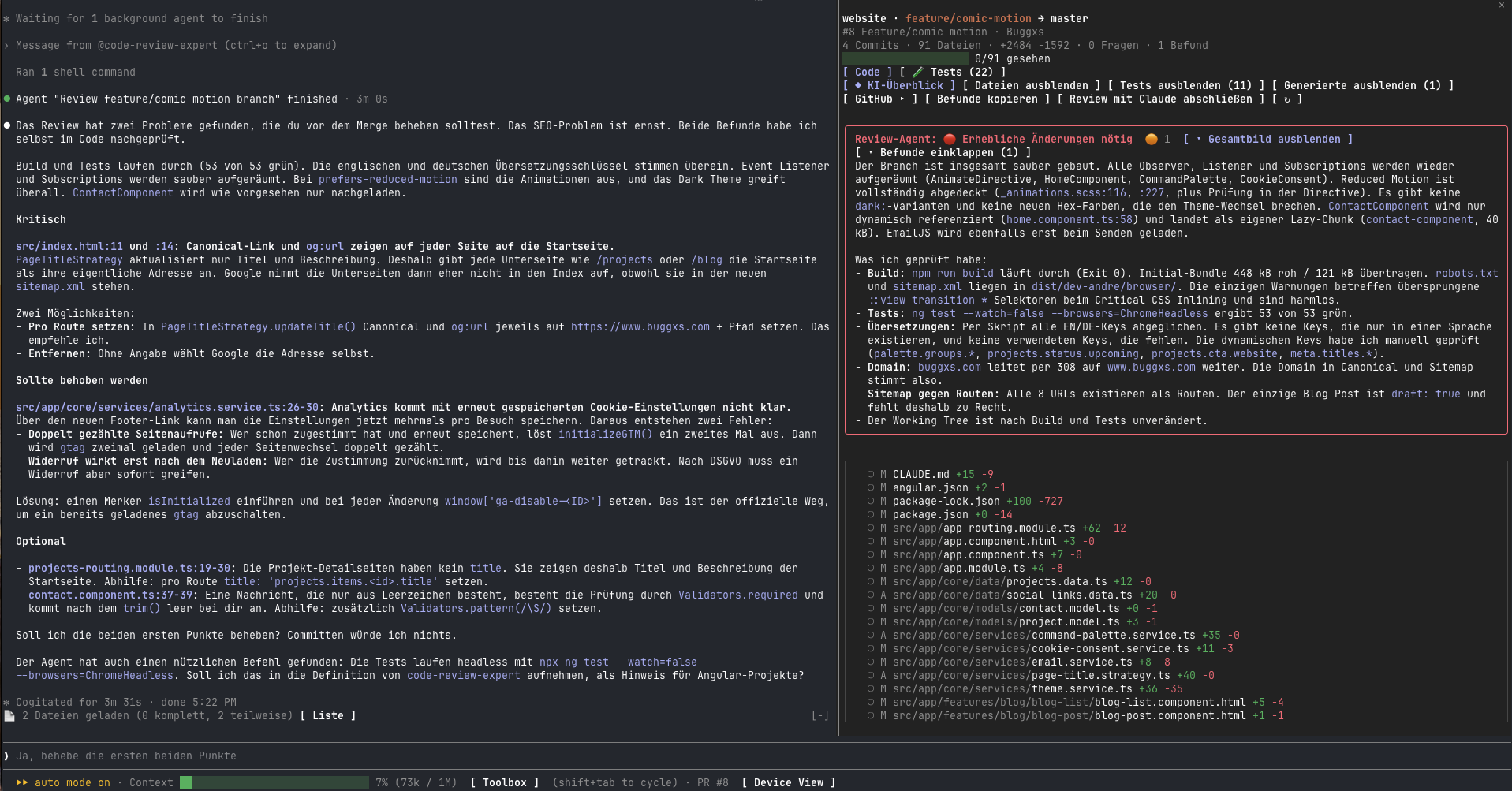
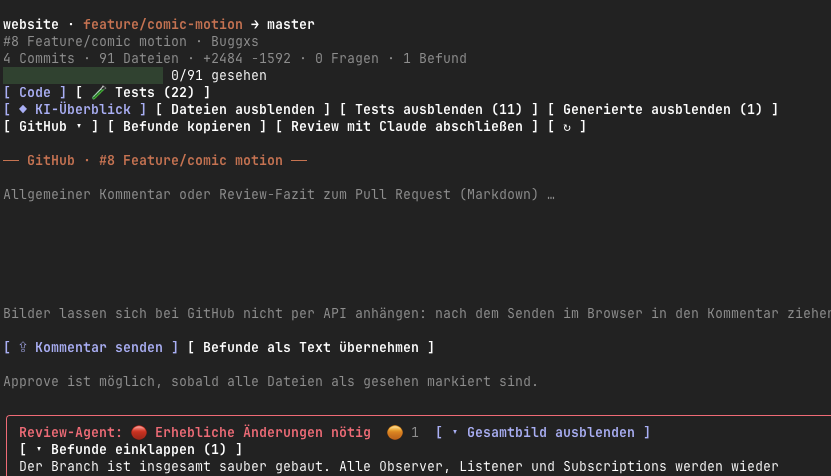
While the agent works, I go through the files and the diff myself. When it finishes, the pane shows an overall verdict (🟢, 🟡 or 🔴), the changed files with additions and deletions, and a progress bar showing how many files I have already seen. In the end I have my own view and the agent's verified findings.
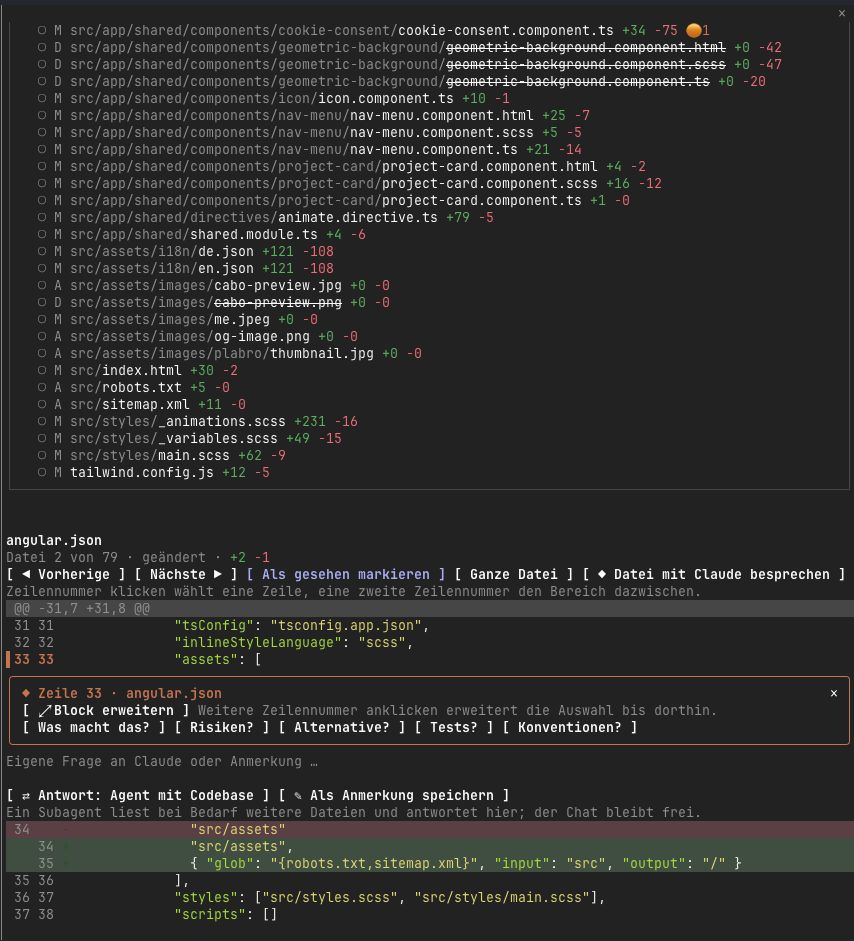
To see only the files that matter, I hide the ballast. “Hide tests” removes test files from the file list, navigation and progress bar, and “Hide generated” does the same for generated files such as lock files or *.g.dart. For Python, empty files like an empty __init__.py come on top, and the pane hides them by default. The files only disappear from my view.
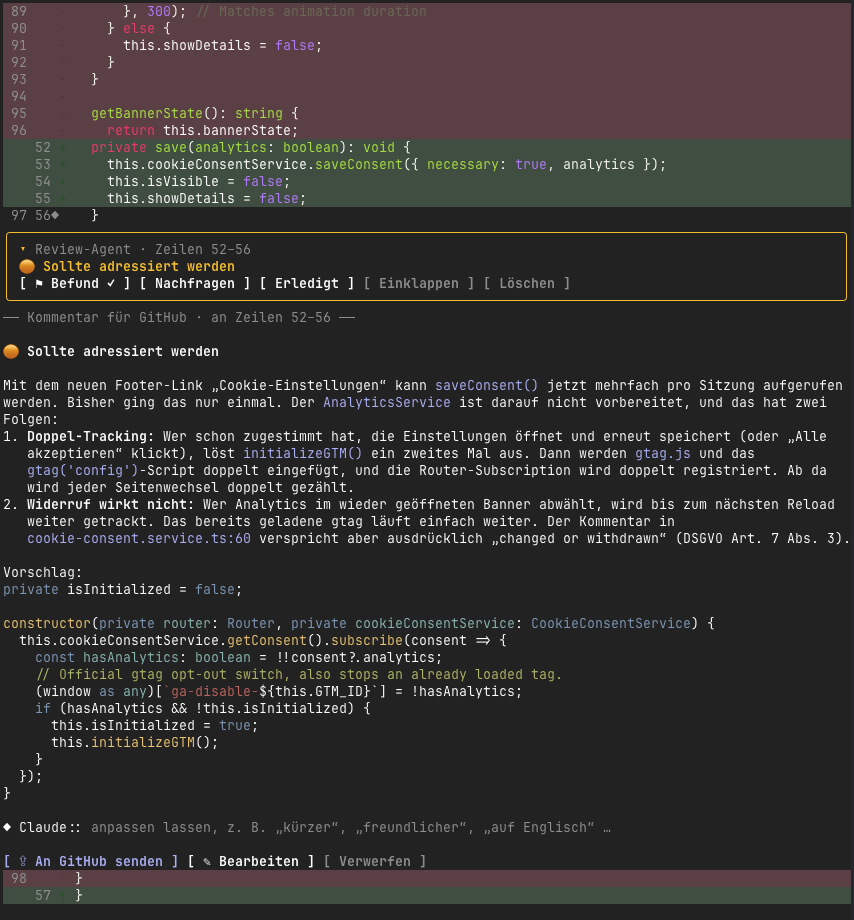
Findings appear as cards right at the affected diff line. I click a line number, ask a question (“Why is this a problem?”), discuss a whole file with the agent, confirm a finding or mark it as done. The context stays in the same conversation, and I do not copy anything.
An example from this review: with the new footer link “Cookie settings”, saveConsent() can be called several times per session. The agent reports a finding for it (🟠 “Should be addressed”): visits are counted twice, and withdrawing consent only takes effect after a reload. It delivers the comment for GitHub right away, including a suggested fix. I had both problems from the review fixed afterwards.
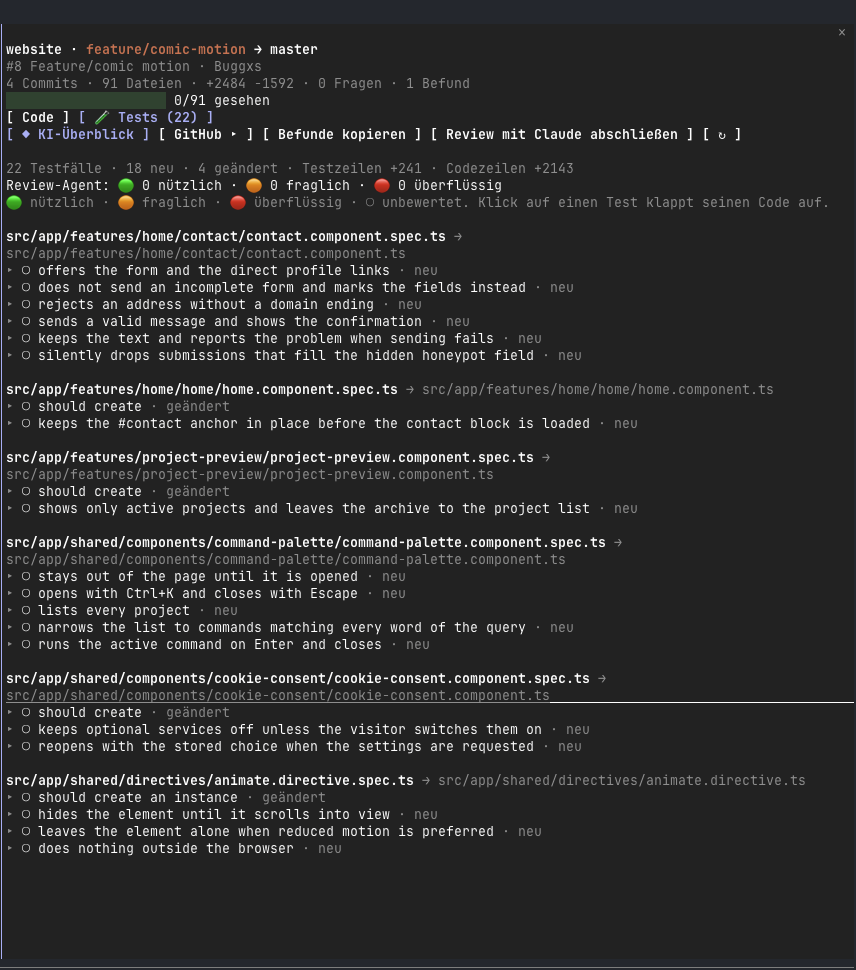
A second tab lists all test cases of the branch. It serves a different purpose than the filter: it shows me which tests are useful and which are superfluous, because agents often write tests that secure nothing. And to be honest, once unnecessary tests make it into the codebase, they never leave again. The agent can rate each test case: useful (🟢), questionable (🟠) or superfluous (🔴). In the image, all of them are still unrated. A click expands the test code.
Pulling in the fix and finishing up
When the developer pushes a fix, I fetch it with a quick call (“pull”). The agent checks whether the commit resolves the finding, marks it as done in the pane, and the verdict switches from 🟡 to 🟢. Finally, the agent drafts the comment for the merge request or pull request, and I can have it adjusted, for example shorter, friendlier or in English. I read it, send it to GitLab or GitHub and approve without opening the page in the browser. Approving only works once all files are marked as seen.
The workflow keeps learning
If the agent notices something during a review that could be improved in the review agent, the skill or the mods, it lists it once more at the end and proposes how the workflow could change. It asks first, and nothing changes without my approval. That way the workflow improves a little with every review.
Important files first
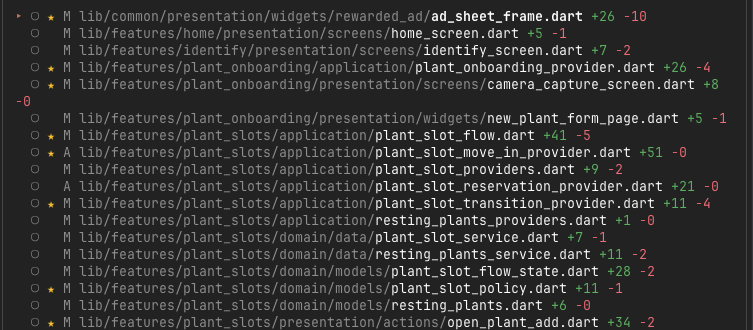
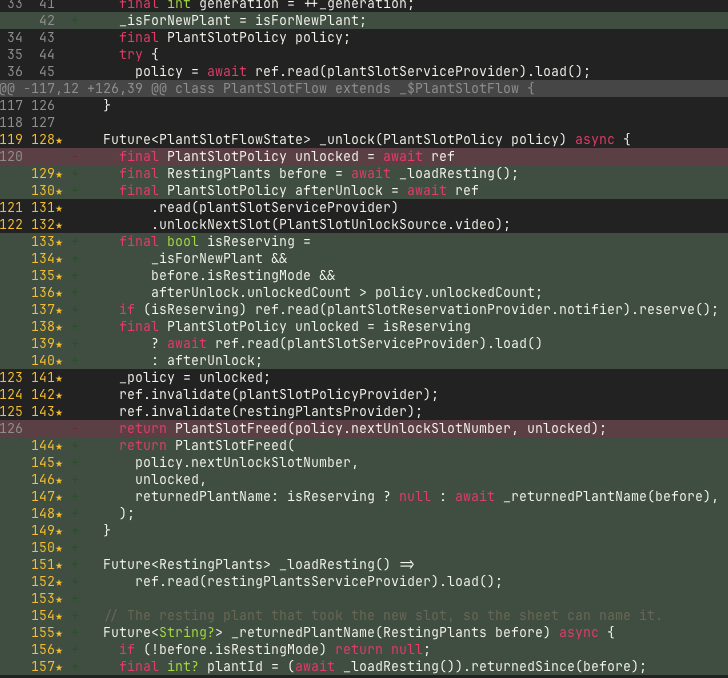
Pull requests keep getting bigger, so the focus is on what matters most. New is a section in the agent's report: “Look closely”. It names the files and lines I should read myself: business logic, functional decisions, error handling, security and places where the agent is unsure. It leaves out plain class definitions, data classes, constants, enums, configuration and wiring. The pane marks the named files with ★ in the file list, shows the reason above the diff and puts ★ next to the line numbers, so I navigate straight to them. In my experience the agent checks the standard files well enough. I read less and land on the places where my decision is needed.
Limits
- Chat and pane drift apart briefly until the agent re-reads the list of open findings.
- Images cannot be attached to a GitHub comment through the API. Screenshots have to be dragged into the comment in the browser after sending.
Extension: testing on the device
The clicking around in the simulator or emulator that I listed above as a manual step is not part of this setup yet. Another mod adds it: the agent builds the app, launches it on a device and verifies findings right there. How it works is covered in the post Claude tests the app itself: simulator, emulator and device.
Conclusion
I work more concentrated on the review because agent and developer complement each other in one window. I ask questions about the changes and decide myself whether a suggestion from the agent fits the ticket and the documentation and whether I adopt or discard it. In my assessment, this makes the review cleaner and more professional. How the pane also shows the device, so that I handle the clicking around in the emulator there as well, follows in a separate post. The agent does the legwork, I check and decide.
This is where I stand today and how I work. I cannot yet say what it will look like in the future: at least for the important areas, I currently believe a developer should still take a look themselves.